
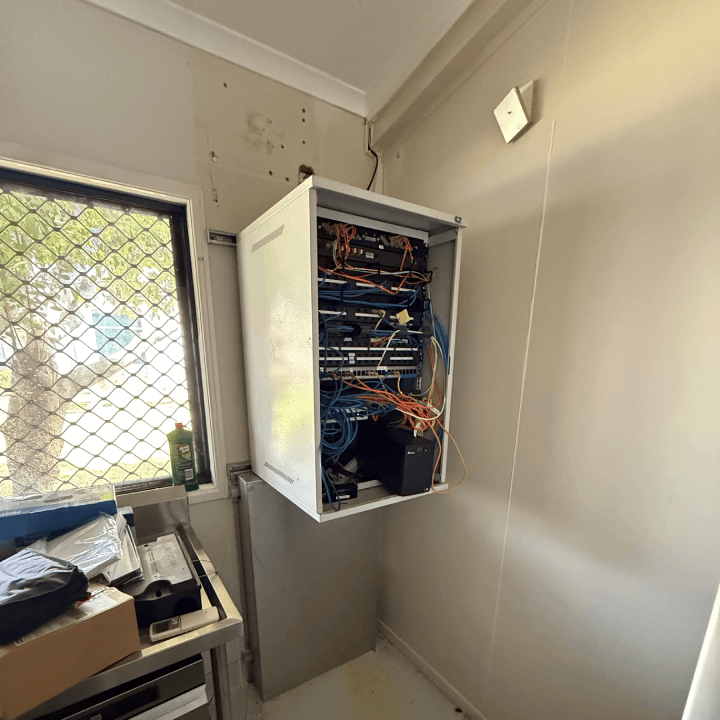
Home data cabinets in plain English
A home data cabinet is a central box where every network cable in your house ends up, so your modem, switch and wired connections all live in one tidy, easy-to-manage spot. If your Wi-Fi drops out when you're working from home or the kids are streaming, or you've got a mess of cables behind the TV, it's probably time to think about one.
- It won't make your internet faster by magic, but it makes everything more reliable and easier to fix.
- It's ready for whatever you add next, because upgrades happen at the cabinet, not in your walls.
What a home data cabinet is, in plain English
Think of it as the switchboard for your internet. Your electrical switchboard takes power from the street and splits it into circuits around the house. A data cabinet does the same thing for network signals.
The industry calls this structured wiring. It's a system where data, phone, TV and sometimes audio and video cables all run back to one central panel, rather than snaking around the house in a mess. Suppliers often describe the enclosure as a breaker box for your network.
Your cabinet might be a small metal or plastic box set in a wall, or a larger one in a cupboard or garage. The size depends on how many rooms and devices you've got.
Home-run cabling: why every cable goes back to one spot
The key idea is "home-run" cabling. Each cable runs directly from a wall plate in a room all the way back to the cabinet, instead of branching from one room to the next.
It's a bit like a star, with the cabinet in the middle and a spoke out to each room. That means a problem in one cable only affects that one room, not the whole house.
What lives inside the cabinet
A typical cabinet has a few key pieces, and none of them is complicated.
- A patch panel, where each cable from the house ends
- A network switch, which lets all your wired devices talk to each other
- Your modem or the NBN connection box
- Your router, or the access point that makes Wi-Fi
- Sometimes a power board, and a small battery backup
Some cabinets also hold TV distribution gear, phone connections and the control gear for smart home systems. The idea is that everything related to your network sits in one place, neat and labelled.
Patch panel, switch, modem and router explained
These four words get thrown around a lot, so here's what each one actually does.
| Piece | What it does | Think of it as |
|---|---|---|
| Modem | Brings the internet into your home and connects to the NBN | The front door |
| Router | Directs traffic between your devices and the internet, and often creates your Wi-Fi network | The traffic controller |
| Switch | Gives you more ports so lots of wired devices can connect | A power board for network cables |
| Patch panel | A neat row of sockets where the cables from your walls end, so a short lead links each room to the switch | The switchboard's labelled breakers |
Some home gear combines the modem and router in one box. That's fine. What matters is that the cables from your rooms land somewhere tidy, so you can connect them to whatever you need.
Why wired points beat Wi-Fi for TVs, desks and cameras
Wi-Fi is great for phones and tablets, but it's shared, it's affected by walls and it can be patchy.
A wired connection is steadier. It doesn't drop out when the microwave goes on, and it doesn't slow down when everyone's online. For a TV streaming in 4K, a desk where someone's on video calls all day, or a camera that records around the clock, that stability matters.
Best on a cable
Smart TVs, gaming consoles, desks and home offices, cameras and anything that stays in one place.
Fine on Wi-Fi
Phones, tablets, laptops you carry around and small smart gadgets.
The bonus
If the fixed things in your house are wired, the Wi-Fi has more room for the things that move.
Where to put the cabinet and what it needs around it
Location is a big decision, and it's worth thinking about early.
Pick somewhere central and accessible, like a hallway cupboard, a laundry or the garage. It should be easy to reach but out of the way. Avoid places that get very hot, like a roof space, or damp, like under a leaking tap. A spot near where the NBN connection comes in can shorten cable runs.
The cabinet also needs a power point nearby, and ideally a dedicated one. Our electricians can add one while we're there, so everything's done safely and neatly in one visit.
A quick location test
Can you reach it easily, is it away from heat and water, and is there a power point close by? If it's a yes to all three, you've probably found the spot.
Power, ventilation and Wi-Fi performance
Network gear generates some heat, so it needs a bit of airflow. A cramped, sealed cupboard in a hot Queensland summer isn't ideal. A small vent or a bit of space around the cabinet helps.
Power matters too. A reliable supply keeps your network stable, and a small battery backup can keep it going through short outages. Surge protection helps shield the equipment from storm spikes.
Adding data points to an existing home
You don't need a new build to get a cabinet. Plenty of existing homes can have one added, though the job differs a bit.
In an older home, getting cables through finished walls takes more care. We use roof spaces, under-floor areas and existing paths where we can, and we choose the neatest routes for the wall plates. It's more work than a new build, but it's very doable, and the result is tidy.
Structured wiring is generally easier while a home is being built, but it can be added afterwards. We'll walk through your house, look at the options and tell you straight what's possible. If a room's tricky, we'll say so.
Labelling and testing so faults are easy to find
This is where a professional job shows. Every cable should be labelled at both ends, so you know exactly which wall plate goes to which port.
Every cable should also be tested after it's installed. Testing checks that the cable is wired correctly and performs as it should. If a fault shows up months later, labels and test results make it quick to find. Without them, you're guessing.
Here's a simple three-step version of how we do it:
Step 1: Plan
Choose where each point goes and where the cabinet sits.
Step 2: Install
Run cables home-run to the cabinet and fit the wall plates.
Step 3: Test and label
Test every cable, label both ends and hand you the results.
Cabling is regulated work
In Australia, fixed cabling like this must be done by a registered cabler. Under the ACMA's rules, once the job is finished the cabler prepares a written statement certifying the work complies with the Wiring Rules. We hold Open Cablers Registration #048361.
How it works with the NBN connection
Your NBN connection comes into the house at one point, and the cabinet makes the most of it.
The NBN box, or the modem connected to it, sits in or near the cabinet. From there, your router and switch spread the connection to every room through the home-run cables. If your connection point is in an awkward spot, like a far corner of the house, we can often run a cable to bring it to the cabinet.
Your internet speed still depends on your NBN plan and connection type. A cabinet won't make a slow plan faster. What it does is make sure the speed you pay for actually reaches your devices, without the Wi-Fi losing a chunk of it on the way.
Upgrading later without opening the walls again
Technology keeps changing, and a good cabinet makes upgrades easy.
| You want to… | At the cabinet, you just… |
|---|---|
| Get faster equipment | Swap the switch |
| Add a Wi-Fi access point | Plug it into a spare port |
| Move the TV or turn a bedroom into an office | Change a patch lead |
None of these needs a tradie in your walls. Putting in good quality cable and a few spare points now makes that possible. Cat6a is a popular choice for new installs because it handles faster speeds and will serve you well for years. Spare conduit gives you the option to add more later.
Cat6 or Cat6a: how far can 10 Gbps travel?
Both cables carry 1, 2.5 and 5 Gbps over the full 100 m. The difference shows up at 10 Gbps. Cat6 figures are typical, and depend on conditions.
Most home runs are well under 55 m, so Cat6 does the job in plenty of homes. If you want the extra headroom for the long term, or you have longer runs, Cat6a is the safer pick.
Is a cabinet worth it for your home
It depends on how you live. If you've got a few devices, mostly on Wi-Fi, and everything works fine, you may not need one. A cabinet makes the most sense if:
- You work from home and need a rock-solid connection
- You have smart TVs, gaming consoles or streaming boxes
- You're building or renovating and the walls are open
- You've got cameras or a home office
- You're tired of dropouts and want something tidy
If that sounds like you, it's a smart upgrade. A neat, ready-to-go setup can also appeal to buyers when you sell.
We're a family-owned team in Bellmere, with an Open Cablers Registration (#048361) and an Electrical Contractor Licence (#90211), so we can handle both the data and the power. Our work comes with a 5-year workmanship guarantee. Send us your plans or a few photos, and we'll put together an upfront, fixed written quote, usually within 24 hours for standard jobs.
Home data cabinet questions we get asked most
Will a data cabinet make my internet faster?
Not by itself. Your speed still depends on your NBN plan and connection type. What a cabinet does is make sure the speed you pay for reaches your devices reliably.
Can a cabinet be added to an existing home?
Yes. It takes more care than in a new build, but we use roof spaces, under-floor areas and existing paths where we can, and choose the neatest routes for the wall plates.
Where is the best place for the cabinet?
Somewhere central and easy to reach, like a hallway cupboard, laundry or garage, away from heat and damp, with a power point close by.
Should I choose Cat6 or Cat6a?
Both carry 1, 2.5 and 5 Gbps over the full 100 m. For 10 Gbps, Cat6 typically reaches about 55 m while Cat6a reaches the full 100 m. Cat6a gives more headroom for the future.
Do I need a registered cabler?
Yes, fixed data cabling must be done by a registered cabler. We hold Open Cablers Registration #048361, and our electricians can add the power point for the cabinet in the same visit.
What happens if a cable develops a fault later?
Every cable is labelled at both ends and tested after installation, so the results and labels make the fault quick to find.
Ready for a tidier, more reliable network?
Send us your plans or a few photos, and we'll put together an upfront, fixed written quote, usually within 24 hours for standard jobs.
Get my quoteSources: ACMA: Cabling in your home or office; ACMA: Cabling provider rules; Cabling Installation & Maintenance: Cat 6A cabling; Monoprice: Cat6A bandwidth; SCHNAP: Home wiring enclosures. Requirements and equipment change, so confirm details with your cabler.