
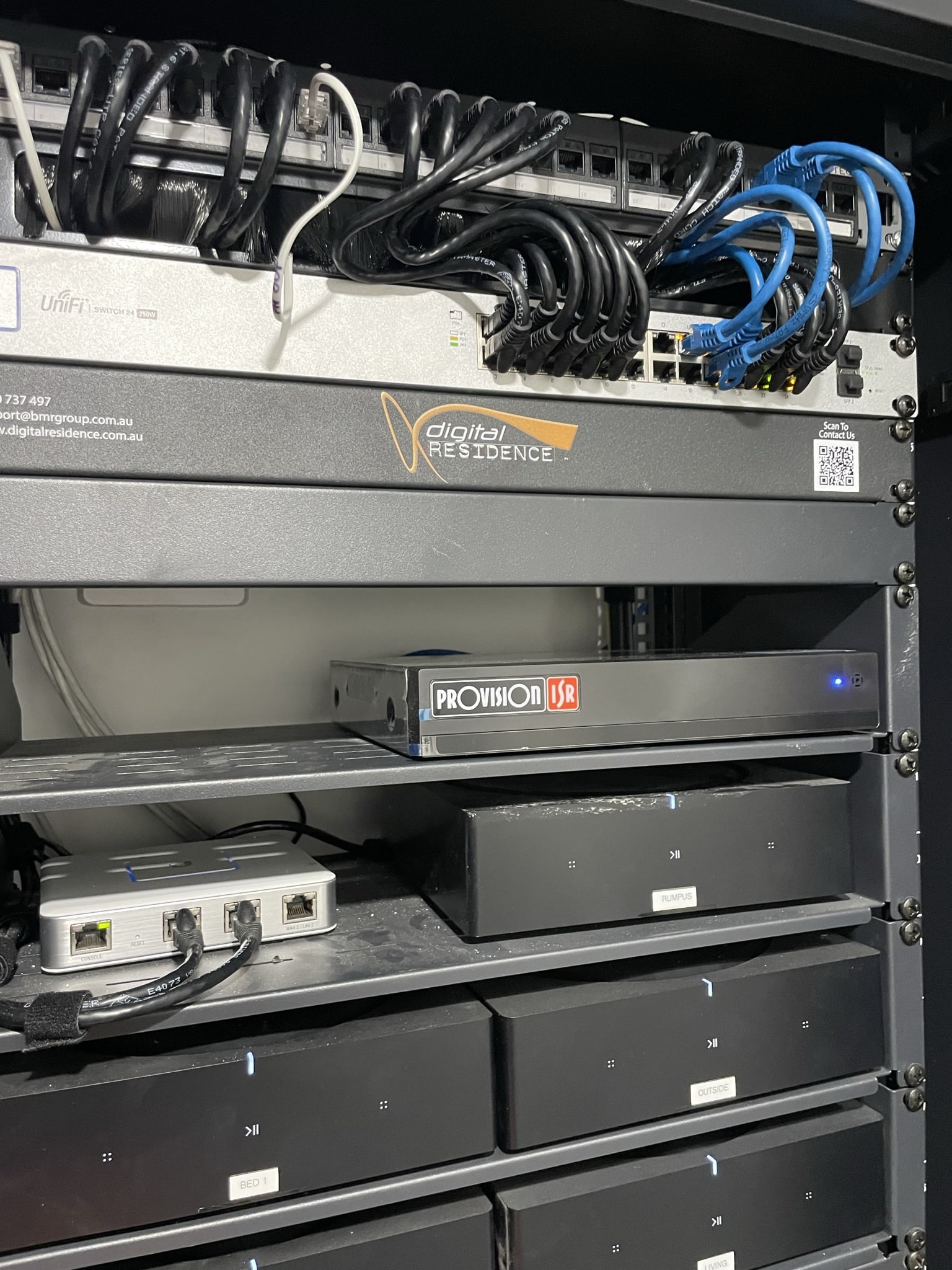
A messy network cabinet is not just an eyesore. It is an active risk to your business: a tangle of unidentified patch leads, loose connections, and equipment that nobody wants to touch because nobody knows what it does or where it goes. If you’ve ever opened a comms cabinet in a Caboolture office or retail premises and felt a slight dread, you already know what this article is about. Getting it sorted is one of the most practical network maintenance investments a small business can make.
What makes a network cabinet messy and why it matters for your business
A network cabinet becomes messy the same way every mess does: one small shortcut at a time. A cable that was a temporary fix but never replaced. A patch lead grabbed from the wrong drawer because the right one wasn’t nearby. A switch added without proper rack mounting because there wasn’t time to do it properly.
Each of those decisions seems trivial in the moment. Over time, they create a cabinet that is slow to work in, difficult to troubleshoot, and genuinely risky from a safety and reliability standpoint.
For small businesses across Moreton Bay, a disorganised comms cabinet means longer downtime when something fails, higher callout costs because it takes longer to find the fault, and unnecessary risk from overheating or unsafe electrical installation inside the cabinet.
The real risks of a disorganised comms cabinet - overheating, downtime, and fire
This is the part that surprises most business owners. A messy network cabinet is not just inconvenient. It can cause genuine damage to your systems.
When patch leads are bunched together across the front of a cabinet, they restrict airflow. Active equipment like switches and routers generate heat. Without airflow, that heat builds up. Overheated network equipment fails prematurely, sometimes suddenly and always at the worst time.
Extension leads plugged into other extension leads inside a cabinet are a documented fire risk [find a source for this info]. Power distribution should be handled by a proper PDU (Power Distribution Unit) mounted securely in the cabinet, not by consumer power boards stacked on top of each other.
Poor cable management also increases the risk of accidental disconnections during any maintenance work. In a tangle of unlabelled cables, it is easy to unplug the wrong thing.
Common network cabinet issues we find when we arrive on site
When Josh and the team arrive to audit a messy comms cabinet in a Caboolture or Moreton Bay business, the same problems appear repeatedly:
- Patch leads that are far too long, looped and bundled at the front of the cabinet
- Mix of different cable colours with no logical system applied
- Unlabelled ports and cables, meaning no one can identify what connects where without tracing each cable manually
- Active equipment placed on random shelves or sitting unsecured on top of other equipment
- Power boards plugged into power boards
- Old, decommissioned equipment that nobody has removed still occupying rack space
- NBN or modem equipment that’s been relocated but the old cabling has never been tidied
None of these is catastrophic on its own. Together, they create a system that nobody trusts and everyone is nervous about touching.
How poor patch lead length and colour creates confusion and slow fault-finding
This is a detail that matters more than most people expect. Patch leads should be just long enough to reach from the patch panel port to the corresponding switch port. Anything longer creates coils that block airflow and obscure what’s connected to what.
A good patch lead length for most cabinet installs is around 25 centimetres. Clean installs use short leads routed neatly through cable management bars between each panel and switch.
Colour coding is the other half of the system. Yellow for phones, blue for data and workstations, green for Wi-Fi access points, red for server or critical infrastructure connections. When every cable type is a different colour, you can understand the structure of your network at a glance. When everything is the same colour, every fault becomes a detective exercise.
Why active equipment positioning inside the cabinet affects airflow and performance
Switches, routers, and firewalls generate heat. The cabinet design assumes that equipment is rack-mounted in the correct positions, with adequate space between devices for air to circulate.
When active equipment is stacked on improvised shelves, or when patch lead bundles block the face of the switch where the ventilation slots are, heat builds up inside the equipment. This shortens the lifespan of the hardware and increases the risk of failure.
The simple rule is: all active equipment should be properly rack-mounted, power distribution should be handled by a PDU mounted at the rear, and nothing should obstruct the airflow paths at the front or rear of the equipment.
Step-by-step: how we audit and tidy a messy network cabinet
The first step in a cabinet tidy is understanding what’s there. Before anything is moved or removed, every connection is traced and documented. This takes time, but it’s what prevents the kind of situation where a cable is removed and half the office loses internet.
Once everything is mapped, decommissioned equipment and unused cables are removed. Then the active equipment is positioned correctly in the rack. Patch panels and switches are arranged so that ports align with the correct cable management path. New, correct-length patch leads in the right colours are installed. Cable management bars are fitted to keep everything clean.
The job finishes with labelling every port and producing documentation that means the next person who opens the cabinet knows exactly what they’re looking at.
Colour-coded patch leads and labelling - the simple system that saves hours
The value of a colour-coded, labelled system only becomes apparent the first time something goes wrong after it’s been installed. Identifying a failed port, tracing a connection, or adding a new device goes from a half-hour job to a five-minute one.
The system doesn’t need to be elaborate. A consistent colour scheme for patch leads, port labels on every patch panel position, and a simple cable map on the inside of the cabinet door is all it takes. That document becomes invaluable the first time a new technician needs to make a change without the original installer on site.
Patch panel and switch placement: how layout affects how quickly faults are found
The layout of equipment inside the cabinet directly affects how long it takes to find and fix a fault. The cleanest arrangement is to position switches directly below or above the patch panel ports they connect to, so that patch leads travel the shortest possible distance from panel to switch.
Cable management bars between each patch panel and switch row keep the leads tidy and allow each connection to be seen and traced without disturbing the rest of the installation.
When this layout is followed, fault-finding is fast. A port with a problem is identified, the patch lead is traced visually in seconds, and the fix is made without touching anything else.
What a properly tidied network cabinet looks like after a Connected Electricians visit
A properly tidied network cabinet has everything you can see making sense immediately. Patch leads are short, neatly routed through management bars, and colour-coded by system. Every port is labelled. Active equipment is rack-mounted with clear airflow space. The PDU is mounted at the rear and not overloaded. There are no loose cables, no mystery equipment, and nothing sitting where it shouldn’t be.
The inside door has a simple diagram showing which port connects where. The next time anyone needs to add a device, move a connection, or find a fault, they can do it confidently and quickly.
That’s what a properly finished commercial data cabling job looks like, and it’s what every Caboolture and Moreton Bay business deserves in their comms room.
How to keep your comms cabinet organised as your business grows
The key to a cabinet that stays tidy is having a system and following it when anything changes. Every new cable gets the correct length patch lead in the correct colour. Every new device gets rack-mounted properly. Every change gets updated in the documentation.
This is easier to maintain than it sounds, because a well-organised cabinet is faster to work in. The right habits develop naturally when the system is working.
For growing businesses that expect to add desks or devices in the next 12 to 24 months, planning ahead during the initial tidy means leaving spare patch panel ports, ensuring there’s rack space for additional equipment, and documenting the structure in a way that scales.
When a tidy-up is enough and when the whole cabinet needs replacing
Most messy network cabinets can be significantly improved with a proper tidy and re-documentation. The core infrastructure is usually sound; it’s the organisation and labelling that’s the problem.
Replacement becomes the right answer when the patch panel or cabinet is too small for the current number of connections and can’t be expanded, when the physical cabinet itself is damaged, incorrectly rated, or unsafe, or when the cable infrastructure feeding the cabinet is also degraded and needs to be replaced at the same time.
A licensed data cabler can assess this quickly. If the cabinet is the right size and the infrastructure is solid, a tidy-up is the most cost-effective solution. If the cabinet is already full or the underlying cabling is poor, the right answer is a proper structured cabling installation.
Getting documentation right - cable maps, port labels, and as-built diagrams
Documentation is the part of data cabling that most installers skip, and the first thing every business wishes existed when something goes wrong six months later.
At a minimum, every comms cabinet should have a cable map showing which physical cable runs to which patch panel port, which port connects to which switch port, and what device sits at the other end of each run. Port labels that match this documentation mean anyone can follow the system without needing to call the original installer.
As-built diagrams go one step further and show the physical layout of the premises, the location of every data outlet, and the path of every cable run. For commercial and strata clients across Caboolture and Moreton Bay, Connected Electricians provides clear service reports and photos as part of every job.
If your network cabinet is a problem you’ve been putting off, contact Josh and the team for a free quote. We’ll assess the cabinet, tell you what it needs, and give you a clear price before any work starts. One visit. Upfront pricing. Backed by a 5-year guarantee.