
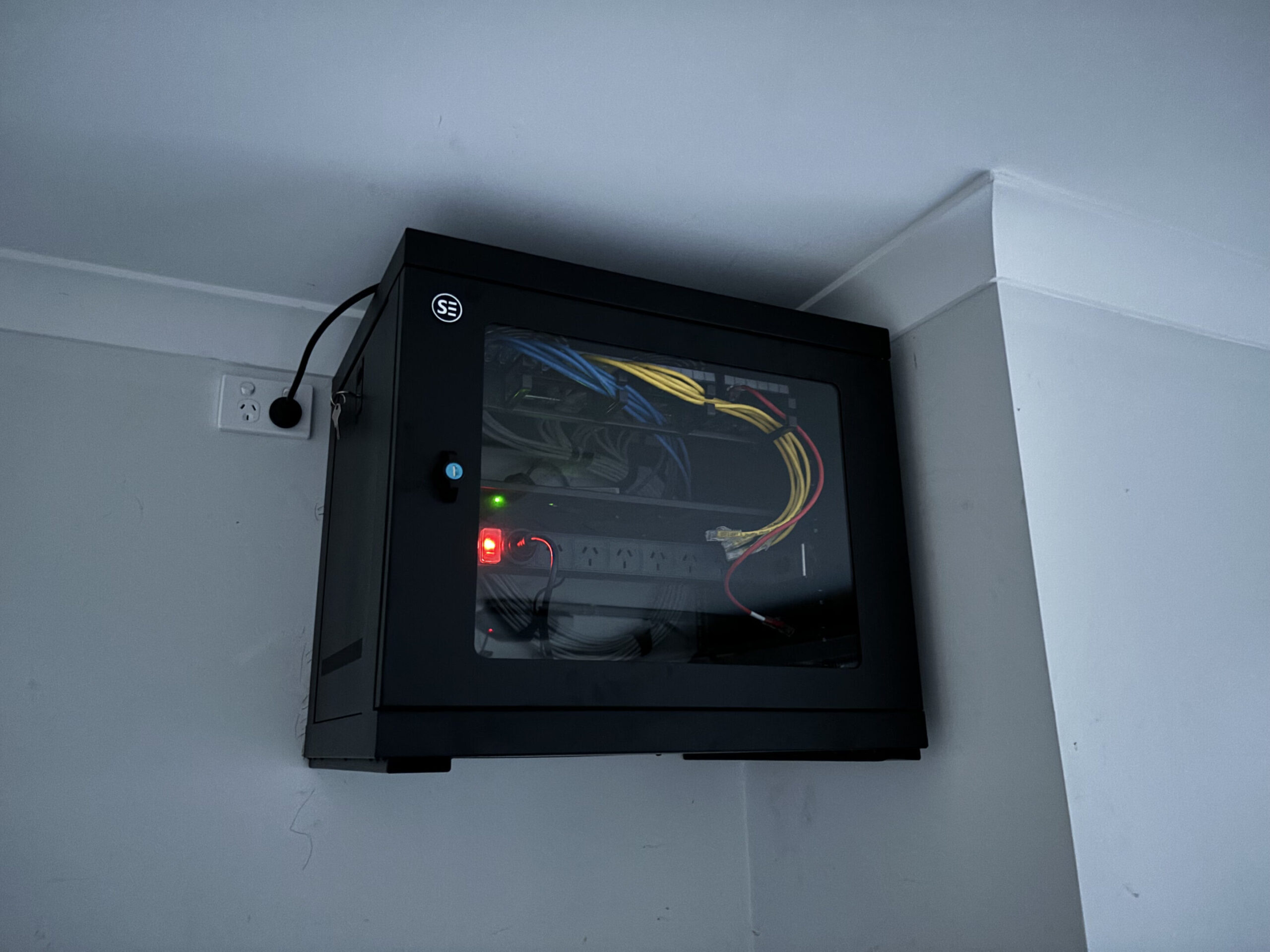
VoIP phone systems need a reliable, wired ethernet connection with PoE (Power over Ethernet) capability to deliver consistent call quality, and if your cabling or switch infrastructure isn’t set up correctly, you’ll hear it in every call you make. If you’re a small business owner in Caboolture or across the Moreton Bay region who’s recently moved to a VoIP phone system, or is planning to, the cabling and network setup behind it matters more than most installers will tell you.
What is VoIP and why does cabling quality affect call quality so much
VoIP stands for Voice over Internet Protocol. Instead of sending your voice through a dedicated telephone line, it converts the audio to data packets and sends them across your internet connection or local network. Those packets need to arrive quickly, in the right order, and without loss. When they don’t, you get the audio problems that most people associate with bad VoIP: choppy audio, echo, lag, and dropped calls.
The quality of the physical cabling between the phone and the network switch directly affects how reliably those packets travel. A cable with a bad termination, a run that’s too long, or a connection that’s picking up interference will introduce exactly the kind of packet loss and inconsistency that destroys VoIP call quality. This is why cabling quality is not a secondary consideration in a VoIP installation. It’s the foundation.
How PoE powers your VoIP phone through the ethernet cable and why that matters
PoE (Power over Ethernet) allows a single Cat6 cable to carry both data and power to the phone. The switch sends a low-voltage current along the same cable that carries the VoIP data. The phone draws the power it needs from that cable and uses the same connection for all its communications.
Without PoE, each desk phone needs its own power adaptor plugged into a mains socket. In an office with 10 phones, that’s 10 extra power adaptors and 10 extra mains sockets that need to be available at each desk. With PoE, it’s one cable per phone. Cleaner, simpler, and significantly easier to manage.
For small businesses in Caboolture and the Moreton Bay region that are fitting out a new office or upgrading from a traditional PABX system, PoE cabling with a PoE-capable managed switch is the standard approach.
Why wired VoIP is more reliable than WiFi-connected phone systems
VoIP over Wi-Fi is possible, but it’s not the right choice for a business environment. Wi-Fi introduces variability that voice traffic cannot tolerate. Signal strength fluctuates. Multiple devices compete for bandwidth. The connection that’s strong at 9am when only two people are in the office can be poor by 10am when everyone has arrived and connected.
Wired VoIP has none of these issues. The phone’s connection to the network is stable, consistent, and unaffected by what’s happening on the wireless network. Call quality is predictable. The system is easier to support and troubleshoot.
For any business office where phone calls are a serious business tool, wired VoIP with a proper PoE cabling installation is the right approach. Wi-Fi VoIP may be acceptable for occasional soft-phone use on a laptop, but it’s not a substitute for a dedicated wired phone at a desk.
The right ethernet cable spec for VoIP - Cat5e, Cat6, or Cat6a
Most VoIP desk phones require between 5W and 13W of PoE power, which is well within the 15.4W maximum of the standard 802.3af PoE specification. A Cat5e cable can technically support this. However, Cat6 is the correct choice for new VoIP cabling installations, for several reasons.
Cat6 has better crosstalk rejection and signal integrity than Cat5e. In an office environment with multiple cable runs in close proximity, Cat6’s improved performance matters. Cat6 also future-proofs the installation for 10 Gbps data speeds and higher-power PoE devices.
Cat6a is rarely needed for desk phone applications but becomes relevant if the same cable run also needs to support higher-speed data devices or if the run is close to the 100-metre maximum. For most small office VoIP installations in Caboolture, Cat6 is the right call.
How many ethernet ports does a VoIP desk phone actually need
Most VoIP desk phones have two ethernet ports built in: one that connects to the wall data outlet, and a second passthrough port that connects to the computer on the same desk. This allows the phone to act as a small switch, so the desk only needs one cable run but can support both the phone and the computer.
This is a useful feature, but it comes with a trade-off. Phone and data traffic share the same cable run to the switch. For most small offices, this is fine. For offices where call quality is critical, running separate data points for the phone and the computer gives you the option to prioritise voice traffic properly at the switch level.
The recommendation is to plan for one data point per desk as a minimum for VoIP, and two where call quality is a business priority.
What is a PoE switch and how to choose the right one for your office phones
A PoE switch looks like a regular network switch but has the ability to send power down ethernet cables to connected devices. For a VoIP installation, you need a switch with enough PoE ports for all your phones plus your Wi-Fi access points, enough total PoE budget (the total wattage available across all ports) to power all devices simultaneously, and for VoIP specifically, it should be a managed switch.
An unmanaged switch is plug-and-play but cannot separate voice and data traffic, and cannot prioritise VoIP packets over other network traffic. A managed switch gives you VLAN and QoS capability, which are essential for reliable call quality in a shared office network.
For a 10-phone office, a 24-port managed PoE switch with a 185W PoE budget is a typical starting point. Your data cabler or IT provider can confirm the right specification for your number of phones and access points.
VLANs and QoS: the network settings that keep voice traffic smooth
VLAN stands for Virtual Local Area Network. It allows you to segment your network traffic even when it’s all running over the same physical cables. With VLANs configured, your VoIP phones can be on a dedicated voice VLAN, completely separate from your computers, printers, and guest Wi-Fi, even though they all share the same physical network infrastructure.
QoS stands for Quality of Service. It allows the switch to prioritise certain types of traffic. With QoS configured for voice, the switch ensures that VoIP packets are delivered ahead of file downloads, video streaming, and other less time-sensitive traffic. This dramatically reduces the risk of audio issues even during periods of high network usage.
Both VLANs and QoS are configured on the switch, not the cabling. But they only work correctly if the cabling infrastructure is solid. A managed switch with VLANs and QoS running over properly installed Cat6 cabling is the foundation of a VoIP system that just works.
Managed vs unmanaged switches and why it matters for call quality
The difference between a managed and unmanaged switch for VoIP comes down to control. An unmanaged switch treats all traffic equally. If someone starts downloading a large file while you’re on a call, the switch has no mechanism to protect the call from that competition. The result can be choppy audio or dropped connections.
A managed switch lets you set rules. Voice traffic gets priority. The VoIP VLAN is isolated from other network segments. You can monitor which ports are active and identify problems quickly. When something goes wrong, a managed switch gives you the information you need to find and fix it.
For any business in Caboolture that relies on VoIP for customer calls, a managed switch is not optional. It’s part of the system.
How to plan a VoIP cabling layout for a small Moreton Bay office
Planning a VoIP cabling layout starts with the number of phones and their locations, then works backward to the comms cabinet. Every phone location needs a Cat6 data outlet. The switch needs to be large enough for all phone ports plus computer ports, access points, and any spare capacity for growth.
The comms cabinet needs space for the managed PoE switch and a patch panel to terminate all the cable runs. The cable runs from the cabinet to each desk should be within 90 metres of structured cabling (leaving 10 metres allowance for patch leads at each end to stay within the 100-metre total).
For any office in Moreton Bay where the runs may approach 90 metres, Cat6a becomes worth discussing with your cabler. For most small offices in Caboolture and surrounds, Cat6 at standard run lengths is more than adequate.
Moving from an old PABX to VoIP: what cabling you may need to upgrade
A traditional PABX system runs on telephone cable, which is very different from the Cat6 Ethernet cabling that VoIP requires. If your existing phone points are connected to a PABX with telephone cable, those runs cannot be reused for VoIP without replacement.
In practice, moving from a PABX to a VoIP system in a Caboolture office often means a full data cabling installation if one doesn’t already exist. Existing data points for computers can often be reused for VoIP with a phone passthrough, but the telephone wiring itself is not compatible.
The cabling assessment should happen before the VoIP system is purchased or provisioned, not after. Knowing what’s already usable and what needs to be installed determines the total cost of the migration.
Migrating to VoIP: how Connected Electricians handles the cabling side
Josh and the team at Connected Electricians handle the physical cabling side of VoIP migrations for businesses across Caboolture, Morayfield, North Lakes, and the broader Moreton Bay region. We’re licensed electricians and registered data cablers (Licence 90211, Cabler Reg 048361), which means every installation is compliant with Australian standards.
We assess existing cabling, confirm what can be reused and what needs to be replaced, and provide an upfront fixed quote for the data cabling installation. We work alongside your VoIP provider or IT team and can coordinate the physical installation with the system configuration so the migration goes smoothly.
What a PoE VoIP cabling install looks like from quote to sign-off
The process starts with a site inspection. We assess the existing infrastructure, confirm the number of phones and their locations, identify the cable routes, and specify the correct switch and patch panel for the installation. The quote is provided upfront with a fixed price. Once accepted, the installation is scheduled, completed, and tested. Every data outlet is tested for continuity and performance. Every patch panel port is labelled. The comms cabinet is documented. Sign-off includes confirmation that every phone has a working, tested data outlet, the switch is correctly specified and installed, and the system is ready for the VoIP provider or IT team to complete the configuration side. If you’re planning a VoIP installation in a Caboolture or Moreton Bay business and want the cabling done right from the start, contact Connected Electricians for a free, no-obligation quote today.